- 에이나우
- 기본 과정
- ChatGPT 에이전트 빌더
진짜 사람이 찍은 릴스 AI 아바타 만드는 방법
진짜 사람이 찍은 것 같은 릴스 AI 아바타 만드는 법
- 릴스 영상을 저장 또는 공유하기로 기록 해놓습니다.
- DM으로 받은 링크를 카톡으로 옮겨 놓습니다.
- PC로 접속해서 AI 즐겨찾기 폴더를 만들어 저장해놓습니다.
- 바로 사용을 해봅니다. 절대 미루지 마세요. (⭐ 제일 중요)
AI 아바타 제작 방법
이런 아바타는 누구나 5분만 배우면 쉽게 만들 수 있습니다.
두 번째
이 프롬프트를 복사하세요.
{ "prompt_type": "image_generation", "output": "single_image_only", "aspect_ratio": "9:16", "subject": { "demographics": "Korean woman, around 25 years old", "hair": { "color": "Natural black", "style": "Long, soft natural waves", "texture": "Smooth, airy, minimal styling" }, "face": { "skin_tone": "Light Korean skin with a natural dewy glow", "eyes": "Large deep brown eyes, soft idol-like gaze, natural long lashes", "eyebrows": "Natural straight or softly arched Korean brows", "lips": "Soft rose-beige gradient tint, naturally full", "makeup": "Clean and subtle K-idol style with light blush and natural eyeliner" } }, "apparel": { "top": { "item": "Simple ribbed knit top or cardigan", "color": "White or cream", "details": "Minimal buttons, fitted silhouette, modest scoop or V-neck" }, "bottom": { "item": "Light-wash denim jeans", "color": "Soft blue", "visibility": "Waistband and upper portion visible" }, "accessories": [ "Minimal thin silver necklace" ] }, "pose_and_framing": { "type": "Selfie", "angle": "Slight high angle, natural selfie perspective", "framing": "Close-up portrait to upper body, vertical 9:16 crop", "body_position": "Head gently tilted, natural posture", "gaze": "Warm, soft direct eye contact with camera", "directive": "Selfie-style image as if taken by the subject, but the phone or hands must not be visible in the frame" }, "environment": { "setting": "Cozy personal bedroom", "flooring": "Light wood flooring", "background_elements": [ "Soft natural daylight from a window", "Neutral white or beige bedding", "Small dresser or desk with neatly arranged items", "Small plant or light clutter for a daily, natural mood" ] }, "technical_details": { "camera_model": "Smartphone Camera (e.g., iPhone 13 Pro Front Camera)", "lens": "23mm wide-angle equivalent", "aperture": "f/2.2", "shutter_speed": "1/60s", "iso": "ISO 100", "white_balance": "Auto, warm natural daylight", "lighting": "Soft diffused window light", "focus": "Sharp focus on eyes with soft background blur", "resolution": "High-resolution", "generation_directive": "Single portrait image only; no multi-cut or variations; strictly 9:16 vertical format" } }
세 번째
- 여기서 중요!
이 프롬프트는 JSON프롬프트입니다.
JSON 프롬프트란? 자연어 대신 JSON 형식의 키-값 구조로 AI에게 할 일을 명확하게 지시하는 프롬프트
JSON프롬프트 안 에 내가 원하는 아바타, 인물의 형태를 디테일하게 수정하는 것이 내가 원하는 아바타가 만들어지는 핵심입니다.
이 프롬프트를 복사해서 GPT 또는 제미나이와 내가 원하는 모델을 만들어보세요.
“이 프롬프트를 검정색 단발 헤어스타일에 흰색 셔츠에 검정 바지를 입고 있는 30대 초반 한국인 여성으로 바꿔줘”
생성 후
“이 여성이 실제 사람 같이 보이기 위해 디테일한 부분을 수정해야 한다면 어떤 것을 수정하면 될까?”
네 번째
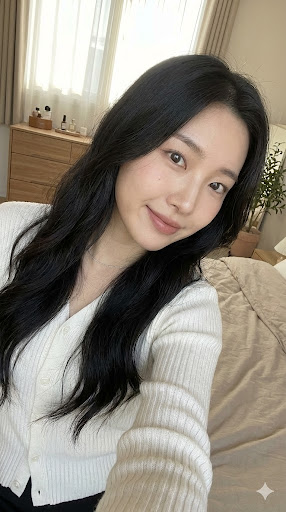
그러면 아래와 같은 이미지가 생성됩니다.
다섯 번째
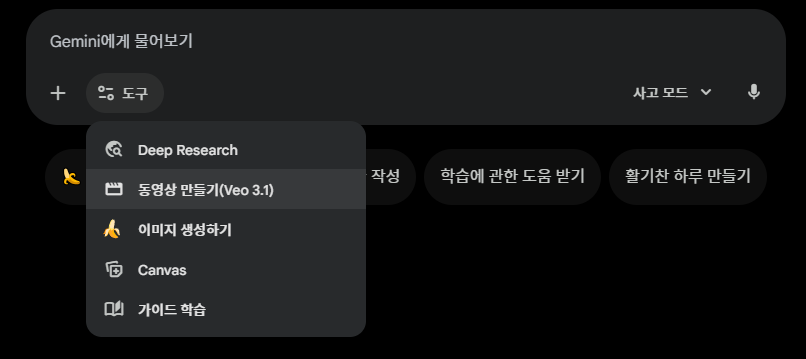
이제 제미나이 Veo 3.1로 영상을 생성합니다.
여섯 번째
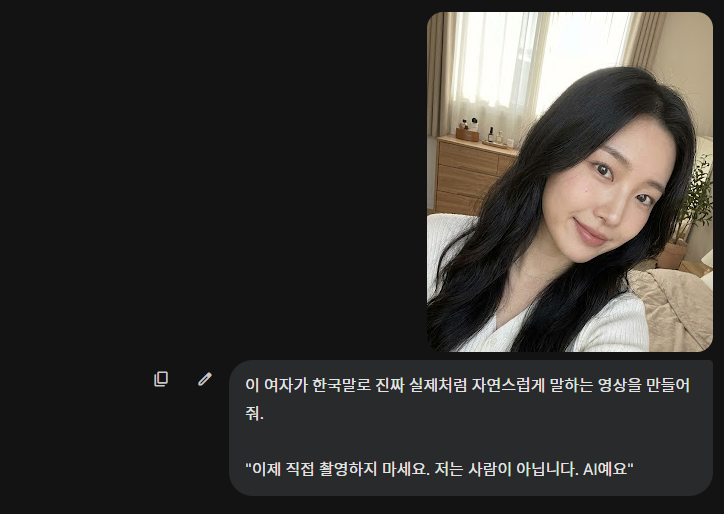
방금 생성한 이미지를 넣고 이렇게 프롬프트를 입력합니다.
일곱 번째
그럼 이런 영상이 완성됩니다.
여덟 번째
이런 영상을 3개 정도 생성해서 연결하면 하나의 영상 콘텐츠가 완성됩니다.
이런 자료를 이메일로 받아보시겠습니까? 무료 강의 안내도 같이 갑니다.
무료로 신청하기