- 신영선
- 기본 과정
- 힉스필드
힉스필드 seedance 2.0 4K
힉스필드 씨댄스 2.0 4K
- 릴스 영상을 저장 또는 공유하기로 기록 해놓습니다.
- DM으로 받은 링크를 카톡으로 옮겨 놓습니다.
- PC로 접속해서 AI 즐겨찾기 폴더를 만들어 저장해놓습니다.
- 바로 사용을 해봅니다. 절대 미루지 마세요. (⭐ 제일 중요)
1. PDF 자료
https://docs.google.com/document/d/1QKEHduAqB1nLIWujnT_8dg1yM1ofBWHJyxsGZNr7KOM/edit?usp=sharing
2. 힉스필드 AI 영상 제작 가이드북
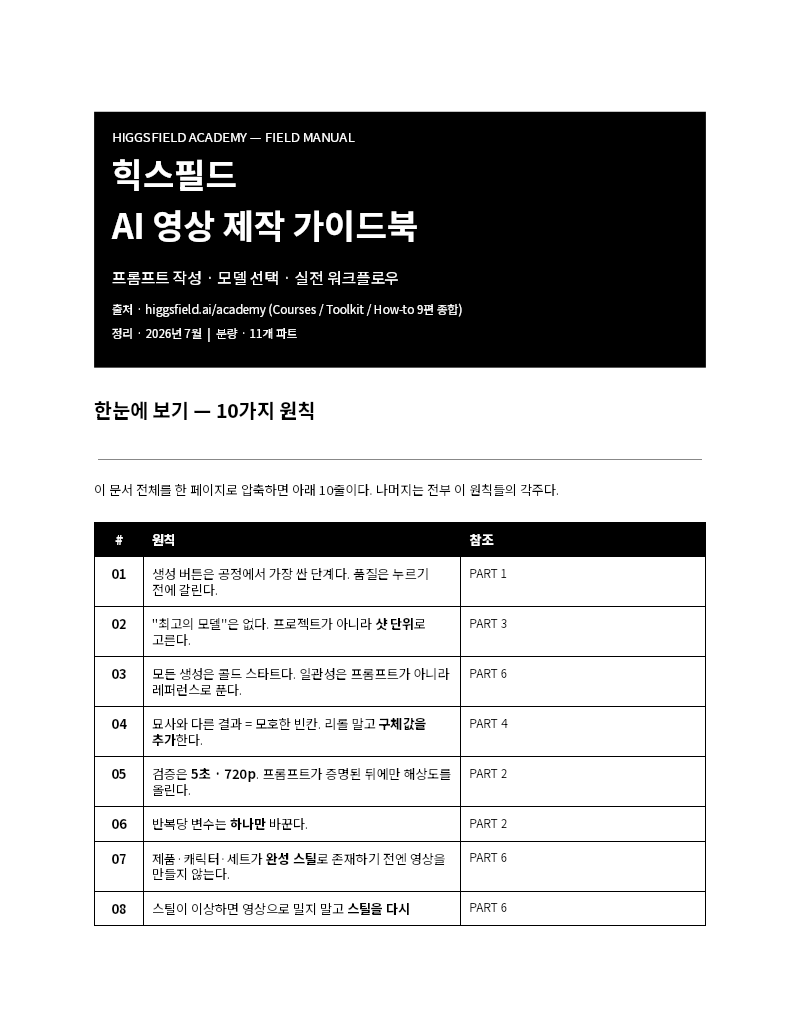
🔗 힉스필드 AI 영상 제작 가이드북 열기 (Google Docs)
3. 영상에서 사용한 프롬프트
Use the reference image as both the camera-movement guide and the primary scene reference.

IMPORTANT CLEANUP INSTRUCTION:
Before generating the video, completely remove every yellow path marking, yellow arrow, scribble, and guide line from the reference image.

The yellow markings are only an invisible camera-route guide. Reconstruct the sky, buildings, billboards, windows, street, and plaza naturally wherever the markings overlap them.

The final video must show a completely clean and natural view of Times Square, with no yellow lines, arrows, drawings, annotations, or route graphics visible at any moment.

Create a first-person, one-take FPV drone flight through Times Square in Manhattan, New York City, based on the cleaned reference image.

The video should feel as though a skilled FPV drone pilot captured it on location in one continuous cinematic take. It must resemble authentic real-world drone footage rather than an AI-generated animation or CGI sequence.

SCENE:

A bright daytime cinematic view of Times Square surrounded by dense high-rise buildings, glass towers, large LED billboards, commercial façades, the pedestrian plaza, moving visitors, street elements, blue sky, and soft daytime clouds.

Preserve the recognizable composition and spatial layout of the reference image, including:

- The tall central billboard tower with the Samsung and Coca-Cola displays
- The Barclays building in the center-right background
- The large dark LED façade on the far right
- The Allianz building and surrounding towers on the left
- The narrow urban corridors between the buildings
- The pedestrian plaza and crowds below
- The original building proportions, perspective, lighting, scale, and skyline identity

Existing billboard graphics, environmental signs, and brand displays visible in the reference may remain as part of the physical location. They must stay stable and naturally integrated into the scene.

Do not add captions, subtitles, interface graphics, floating text, new logos, or watermarks.

CAMERA ROUTE:

Follow the complete hidden yellow route from the reference image in the direction of the arrowheads. Connect all three marked sections into one smooth, uninterrupted FPV flight.

STARTING POSITION — LOWER-RIGHT FOREGROUND:

Begin near the lower-right side of the frame, slightly above the pedestrian plaza and close to the base of the large right-side LED building.

The drone faces diagonally toward the center of Times Square.

Start with a fast, confident forward glide toward the left side of the plaza. Maintain a relatively low altitude while remaining safely above pedestrians, vehicles, street furniture, and signs.

FIRST MOVEMENT — LOW SWEEP ACROSS THE PLAZA:

Fly swiftly from the lower-right foreground toward the lower-center and center-left portions of the scene.

Track horizontally across the plaza while keeping the central Samsung and Coca-Cola billboard tower prominent in the composition.

The flight should feel fast and physically grounded, with realistic forward momentum, controlled altitude, subtle vibration, and natural wide-angle FPV motion blur.

As the drone approaches the left side of the central tower, gradually slow the lateral movement and begin the upward curve indicated by the yellow guide.

Do not collide with pedestrians, traffic signals, billboards, building façades, streetlights, or other objects.

FIRST RISING CURVE — CENTER-LEFT URBAN CANYON:

Near the center-left portion of the frame, bank smoothly and curve upward toward the right.

Rise through the open space between the left-side buildings and the central billboard tower.

Pass near the narrow urban corridor beside the Allianz building and the left edge of the central Times Square structure, but maintain a believable and safe clearance from all solid surfaces.

The movement should include:

- Realistic FPV banking
- Controlled yaw toward the center
- A gradual upward pitch
- Natural acceleration through the curve
- Strong parallax between the foreground façades and distant buildings

Reveal additional depth between the towers as the drone climbs.

CENTRAL TRANSITION:

After completing the first rising curve, continue forward through the open visual space around the central Times Square billboard structures.

Shift the flight path toward the center-right background while maintaining the Samsung and Coca-Cola tower as a major foreground landmark.

The transition between the first and second marked curves must feel continuous and intentional. Do not teleport, cut, dissolve, or abruptly change altitude.

SECOND MOVEMENT — CLIMB AROUND THE BARCLAYS SIDE:

Approach the center-right area beneath and in front of the Barclays building.

Begin a wide upward curve toward the right, following the large yellow arc shown in the reference.

Fly past the surrounding façades and billboards at a believable distance. Emphasize the enormous scale of the buildings through strong foreground-to-background parallax.

As the drone climbs beside the Barclays building:

- Bank gradually to the left
- Increase altitude smoothly
- Rotate the camera toward the upper-center skyline
- Preserve realistic momentum and inertia
- Keep the central Times Square structures visible below and behind

Do not pass through the Barclays building, billboards, glass towers, roof structures, flags, signs, or any other solid object.

UPPER-SKY SWEEP:

At the upper-right and upper-center portion of the scene, complete the wide turn and sweep left across the open sky.

The drone should pass above the main billboard district while looking diagonally downward into Times Square.

Show the vertical canyon of buildings, the pedestrian plaza, layered billboards, glass façades, and distant city structures below.

The turn should feel like a genuine high-speed FPV maneuver with smooth banking and controlled yaw, not a floating or weightless camera movement.

FINAL CURVE — UPPER-LEFT TO TOP-CENTER:

Continue toward the upper-left sky beside the left-side skyscrapers.

Follow the final yellow curve by making a broad leftward arc and then pulling upward toward the top-center portion of the frame.

The drone should climb above the left-side buildings while maintaining safe clearance from all façades and rooftops.

Gradually reduce the banking angle and stabilize the horizon as the drone reaches the final elevated position.

FINAL DESTINATION:

End high in the top-center to upper-left sky, looking back and slightly downward over Times Square.

Finish with a dramatic wide reveal showing:

- The central Samsung and Coca-Cola billboard tower
- The Barclays building
- The surrounding glass and masonry skyscrapers
- The large right-side LED façade
- The pedestrian plaza and visitors below
- The dense urban geometry of Times Square
- The blue sky and soft clouds above the city

The ending should feel deliberate, cinematic, and satisfying, like the final landmark reveal in a premium New York travel film.

OVERALL ROUTE FLOW:

Lower-right foreground above the plaza
→ fast low-altitude sweep toward the left
→ upward curve beside the center-left buildings
→ transition across the central Times Square structures
→ wide climb around the Barclays side
→ sweeping left turn across the upper sky
→ final upward curve beside the left towers
→ elevated wide reveal above Times Square

VISUAL STYLE:

Ultra-realistic, high-resolution cinematic FPV drone footage.

Natural daytime illumination with believable sunlight direction, soft shadows, realistic reflections, atmospheric depth, and properly exposed sky highlights.

Use a wide-angle FPV lens with mild and physically accurate barrel distortion. Include subtle motion blur based on actual camera velocity and shutter behavior.

Preserve realistic detail in:

- Glass windows and reflections
- Metal and concrete façades
- LED billboard surfaces
- Building edges
- Street signs and traffic lights
- Pavement textures
- Clothing and pedestrians
- Clouds and sky
- Deep shadows between buildings

REAL-FOOTAGE REALISM:

The result must resemble genuine video captured by a professional FPV drone carrying a cinema-quality camera.

Use:

- Realistic camera inertia
- Natural acceleration and deceleration
- Physically plausible banking
- Authentic lens distortion
- Real-world exposure adaptation
- Soft highlight roll-off
- Natural shadow detail
- Subtle sensor noise
- Restrained film grain
- Slight atmospheric haze
- Organic surface texture
- True-to-life daylight colors

Avoid an excessively clean, glossy, synthetic, or digitally perfect appearance.

Do not use artificial HDR, excessive sharpening, oversaturated colors, crushed shadows, glowing building edges, or video-game-style lighting.

CINEMATIC FILM LOOK:

Make the footage resemble a high-end New York tourism commercial or cinematic city sequence.

Use natural contrast, soft filmic highlights, realistic dynamic range, subtle texture, and a restrained premium color grade.

Maintain believable exposure when moving between the bright sky, illuminated billboards, reflective glass, and shadowed street areas.

Billboard illumination should affect nearby surfaces subtly without producing artificial neon glow or unrealistic reflections.

CAMERA-MOVEMENT QUALITY:

- One continuous take
- No cuts or transitions
- Smooth and stable FPV movement
- Natural acceleration and deceleration
- Realistic banking during every curve
- Clear and progressive altitude changes
- Controlled pitch, roll, and yaw
- Strong but believable parallax
- No floating-camera sensation
- No random wobble
- No excessive stabilization
- No excessive shake
- No sudden rotation
- No impossible direction changes
- No teleportation
- No clipping through objects
- No interruption or simplification of the route

PEDESTRIANS AND STREET ACTIVITY:

People below should move naturally at realistic walking speeds.

Maintain consistent identities, body proportions, clothing, shadows, and positions across frames.

Do not duplicate, merge, stretch, erase, or transform pedestrians.

Traffic signals, flags, screens, signs, vehicles, and street objects must remain spatially and temporally consistent.

BILLBOARD AND BUILDING STABILITY:

All architecture and billboards must remain structurally stable throughout the shot.

The billboard tower, Barclays building, glass skyscrapers, windows, signs, and LED façades must not bend, melt, resize, flicker, change position, or transform.

Existing environmental signage may remain, but its shapes and placement must remain consistent. Avoid unstable or continuously changing lettering.

STRICT RESTRICTIONS:

Do not show yellow lines, yellow arrows, route markings, scribbles, drawings, or annotations.

Do not show added captions, subtitles, interface graphics, floating text, or watermarks.

Do not remove or redesign the recognizable Times Square environment.

Do not change the original building layout.

Do not add nonexistent towers, streets, billboards, signs, people, vehicles, or objects.

Do not duplicate buildings, pedestrians, signs, windows, or architectural details.

Do not warp glass façades or billboard surfaces.

Do not bend straight building edges.

Do not pass through buildings, billboards, signs, streetlights, people, or other solid objects.

Do not skip, reverse, shorten, or simplify any section of the guided route.

Do not change the final elevated destination.

Do not make the footage blurry, unstable, glitchy, oversharpened, or excessively shaky.

ANTI-AI LOOK:

No AI-generated appearance.
No CGI or video-game rendering.
No plastic or waxy surfaces.
No melting architecture.
No morphing billboards.
No changing building geometry.
No unstable windows.
No crawling textures.
No flickering signs.
No inconsistent reflections.
No inconsistent lighting or shadows.
No duplicated pedestrians.
No deformed people.
No unstable object edges.
No temporal warping.
No unnatural sky motion.
No artificial camera floating.
No hallucinated structures or street elements.

NEGATIVE PROMPT:

visible yellow line, yellow path, yellow arrow, yellow scribble, guide mark, route overlay, annotation, drawing, overlay graphic, added caption, subtitle, interface, watermark, floating text, AI-generated look, CGI look, video-game render, fake city, plastic texture, waxy surface, excessive smoothing, artificial sharpness, unrealistic HDR, oversaturated neon, warped skyscraper, bent building, distorted architecture, melting billboard, morphing façade, changing building shape, broken roofline, unstable window, flickering billboard, unreadable changing sign, crawling texture, unstable reflection, inconsistent shadow, duplicated pedestrian, duplicated building, duplicated object, deformed person, unrealistic crowd, floating camera, excessive shake, random wobble, unnatural banking, impossible turn, sudden rotation, teleportation, clipping through buildings, clipping through signs, collision, wrong route, reversed route, skipped route, simplified path, wrong final destination, glitch, low resolution, heavy blur이런 자료를 이메일로 받아보시겠습니까? 무료 강의 안내도 같이 갑니다.
무료로 신청하기